Jun 2026
by Lim May-Ann
“End-of-life (EOL) equipment” conjures images of ageing hardware and forgotten backup systems. Yet EOL equipment is one of the more preventable cybersecurity risks organisation in Asia Pacific face.
The challenge is not one of technical complexity but organizational discipline, which often stymie small and medium enterprises (SMEs) who lack dedicated IT teams. SMEs face the same cybersecurity risks as larger organisations, and frequently with fewer resources to manage them. The question is not whether SMEs should track EOL systems, but how to do it practically. Here is what you need to know and what you can do starting today.
Why This Matters Now: A Shorter Vulnerability Lifecycle
The vulnerability lifecycle is compressing: flaws that once took skilled researchers weeks to find and weaponise now emerge at a pace no human team can match. Without vendor updates, newly discovered vulnerabilities remain unpatched, and according to the National Institute of Standards and Technology (NIST), unsupported systems present a major cybersecurity risk because they cannot receive vulnerability fixes. Cisco Talos found that nearly 40 per cent of the most actively targeted vulnerabilities affected EOL devices, with a significant share of exploited vulnerabilities more than a decade old. For SMEs, this creates a specific problem: if your firewall, router, or accounting system is no longer receiving updates from its vendor, it is actively getting more dangerous every day.
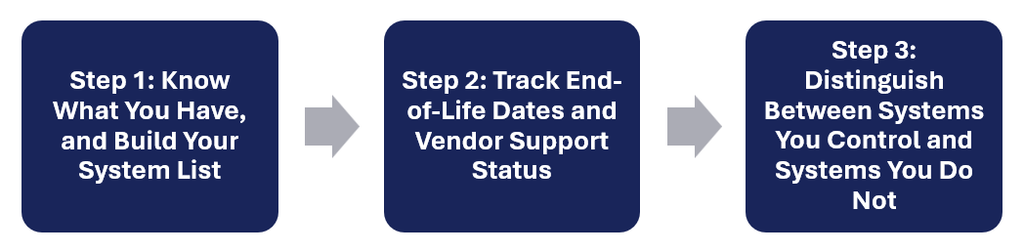
Step 1: Know What You Have, and Build Your System List
Start simple. You do not need complex software. Many security breaches are not caused by sophisticated attacks, but by forgotten, misconfigured, or simply unknown assets.
What to do:
- List every piece of IT equipment and software your organization uses: servers, routers, firewalls, switches, computers, accounting systems, CRM software, email platforms, backup systems.
- For each item, document: (1) what it is, (2) the vendor name, (3) the version/model number, (4) when you purchased it, (5) who uses it.
- Start with a spreadsheet. A shared Google Sheet or Excel file works fine. Some inventory software may also be suitable for use. Keep this list accessible to whoever manages your IT, whether that is one person, an external vendor, or a combination.
- Update it quarterly, either yourself, or delegate a role to this. When new equipment arrives or systems are retired, update the sheet immediately.
Step 2: Track End-of-Life Dates and Vendor Support Status
Knowing what you have is step one. Knowing when support ends is step two.
What to do:
- For each system in your list, find the vendor’s end-of-support (EOS) or end-of-life (EOL) date. Vendor websites have this information, often in a support lifecycle document. Search “[Vendor Name] lifecycle policy” or “[Product Name] end of support date.”
- Add two columns to your spreadsheet: “Vendor Support Ends” and “Risk Level.”
- Systems within 6 months of EOL: mark as HIGH risk. These need replacement planning now.
- Systems past EOL: mark as CRITICAL. These should not be running production workloads.
- Set calendar reminders. When a system approaches EOL (at 12 months, 6 months, 3 months), flag it for review.
e.g. Your company uses a ABC switch purchased in 2017. Search online for “ABC switch model X end of support.” You find support ends July 2026. Today is July 2026. This system is now at risk and needs immediate attention.
Step 3: Distinguish Between Systems You Own/Control and Systems You Do Not
This is where many SMEs may struggle, as your accounting software, email platform, or hosted CRM may be managed by a vendor. You cannot patch them yourself. But you can manage your relationship with the vendor.
For systems you control:
- Enable automatic updates where possible. Most Windows servers, Linux systems, firewalls have automated patching options, which can be switched on.
- Schedule monthly patch windows. Most organizations apply patches on the second Tuesday of each month (Microsoft’s standard release day). Build this into your calendar to check and patch vulnerabilities when fixes are released.
- Test patches on non-critical systems first. Before patching your main server, test on a less critical one, or on a redundant system. This catches problems before they affect operations.
For systems vendors manage (cloud, SaaS, managed services):
- Work with your vendor to update your inventory list and version updates. Ask your vendor directly: “What is the end-of-support date for the version we are running? When do you plan to upgrade?” Get this in writing.
- Document their update policy in your contract or service level agreement (SLA). If they do not have one, request it. This protects both parties.
- Request notification 90 days before any mandatory upgrade. Build time into your budget for testing and change management.
- Do not stay on outdated versions. If your vendor stops supporting an old version, migrate to a new one.
Managing the Vendor Relationship
Many organizations extend infrastructure life by sourcing certified pre-owned equipment from reputable vendors, or by arranging extended support contracts that enable continued patching even after standard support ends. If replacing a system immediately is impossible, talk to your vendor about extended support options. These exist and are often cheaper than the cost of a breach. If extending support is not possible, take steps to migrate the infrastructure to one that can receive support.
The Reality for SMEs
SMEs often lack extensive IT budgets to replace every ageing system on time. CCAPAC is offering this guide as a simple starting point for organisations to begin to track IT inventory, with a spreadsheet and a calendar. With cyberthreats escalating, we encourage organisation to also work with your vendors to plan upgrades, and not wait for a breach to force the issue. In an era where ransomware payments in the region now exceed USD1 million in the majority of cases, preventing one breach through planned maintenance is far cheaper than managing recovery from one. For larger organizations, the Past its use-by-date report from the Australia Strategic Policy Institute (ASPI) may be a helpful reference. Organizations can consider adopting the ‘Legacy Five’ recommendations in the report as a more comprehensive approach to address the cybersecurity risks from EOL equipment.